• Download Easyb MS Word Guide: Learn How To Work Sensibly On MS Word

    am delighted to inform you of my first free EBook on blogging; Easyb MS Word Guide. It is a step by step guide (including pictures) which will teach you how to work sensibly on MS Word 2007....... Read More

  • HOW TO SELECT AND INVITE ALL FACEBOOK FRIENDS AT ONCE.

    On facebook of nowadays,there are many groups/pages which facebookers belong to,and as a blogger or website owner,it's very good to own a page for your blog/site. In order to make your page more popular,you will need to invite...Read More

  • HOW TO UNLOCK MODEM FREE.

    Unlock your modem without paying CC for any BODY You will agree with me,that most huawei modems are tied to just one specific service provider.Different forums, blogs ,websites etc,bring up the issue of modem unlocking,but most times fail to complete it,while some...Read More

Showing posts with label mobile tricks. Show all posts

Friday, 14 March 2014

Author Unknown posted on 02:29 in ,

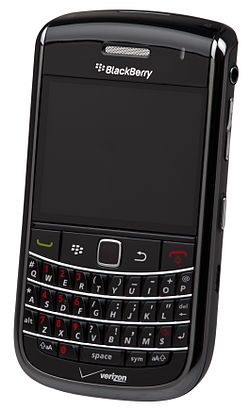
 BB


Have you ever wonder why your Blackberry phone is slow and sometimes freeze? 

Well, The Simple truth is "Every Action, Process on your Phone is Logged". 

You check Mail, Use Facebook, Chat on
Facebook, Use BBM, Yahoo! Messenger, Twitter, All this Processess are logged in the Blackberry Event Logs.


Once the Saved Logged hit some certain levels, It tells on the Phone and then it begins to Slow down the RAM of the Phone, The Simple
Solution is to clear the Event Log Register and Free your Phone from any unneccessary behaviour.

FOLLOW THIS STEPS TO CLEAR
YOUR PHONE EVENT LOG


1. Hold down the ALT key and press LGLG (the letters) while on
your Home screen.

2. You will have to wait a bit while your Phone loads, You will see your event logs.

3. Now, Click the Blackberry menu button and select "clear log" this will clear your Phone Log and keeps your phone working 100% faster!

It works perfectly!!!
Author Unknown posted on 02:18 in ,

As nice as the Blackberry is, Sometimes having to reboot your BlackBerry just because you installed an application can be very annoying, but, having to pull the battery out of your device to do so, makes the process irritating expecially when you're in the Middle of Something.QUICK TIP TO REBOOT A BLACKBERRY PHONE WITHOUT REMOVING THE BATTERY


With today’s Quick Tip we wanted to remind BlackBerry users that if you simply need to reboot your device pulling the battery is overkill. You can perform a “soft reset”, or, reboot your BlackBerry by pressing the Alt, right Shift, and Delete buttons simultaneously. So long as your device isn’t locked up this keyboard shortcut for rebooting your BlackBerry is lot less hassle than physically pulling the battery… 

This also works when your Subscribe to BIS Subscription & you're asked to remove your Battery after some Minutes to make your Subscription Active, Just do the Soft Reset as describe above and Start Pinging on your Blackberry Device.

Some annoying Features, RIM still overlook are seriously killing Most Blackberry Users, No time to Mention here today but will surely list them out when have got the time. Enjoy!!
Author Unknown posted on 02:14 in ,

Amongst others,we have treated some of them in the past.As we ought to know,every device has its own hidden features which can only be unlocked with the help of secret codes.

They include.

blackberry logo.jpg
In today's tutorial, we'll be listing some of the Major and most-popular of this widely-used mobile phone.
Here they are...
  1. The first is the code which works on virtually all mobile devices to check their IMEI number i.e *#06#
  2. Hold “Alt” down & press “RBVS” in the Address Book »To view the source code of webpages.
  3. Hold “Alt” & press “NMLL” »
    This is called the Decibel meter.
    It shows the phone's signal-strength in decibels instead of bars
  4. Address Book data structure rebuild.
    |This forces a data structure re-build in the Address Book.|
    Hold “Alt” & press “RBLD” in the Address Book to do this.
  5. Address Book file verification
    This checks the data in your Address Book for inconsistencies.
    Hold “Alt” & press “VALD” in the Address Book.
  6. To do a “Soft” Reset,which is thesame as Removing the battery for a few seconds.
    Press & hold “Alt”, then hold left-“shift”, then hold “Del”.
  7. To view the "Help Me! menu" for crucial technical information about the device,
    Hold “Alt” & (left) “shift”,then press “H”
  8. To view the Event-Logs,
    Hold “Alt” & press “LGLG”
  9. blackberry.com
    Note 
    The codes below will work mostly when you are viewing the home-screen.
  10. A or C »Phonebook
  11. S » Search.F » Phone's profiles.
  12. W or B » Browser. H » help.
  13. K » Locks the keys.
  14. L » Calendar.
  15. V » Messages.
  16. M » Messages folder. R » alarm.
  17. »Tasks.
  18. U » Calculator.
  19. I » Applications.
  20. O » Options.
  21. P » Phone.
  22. T » Top of page (in browser).
  23. »B » Bottom of page (in browser).
  24. Space » Page down (in browser).
  25. D » Memo pad.
  26. U » Switch between hide/unhide in browsers title-bar.
  27. ALT + NMLL » To use numbers instead of bars for signal strength.
  28. ALT + Right Shift + Del » Hard reset.
Don't forget to use the comment box below....
Author Unknown posted on 02:13 in ,


blackberry bold
These are the basic Blackberry shortcuts which might be useful for you.
I'll be starting with searching of keywords.
  • To Search for text in a message->Press S
  • To search for a text in an attachment or on a web page->Press F
  • To move the screen a step backward->Press the Escape key
  • Return to your Home screen or application list->Press the End key
  • To Switch applications->Hold down the BB data flow icon.
  • To check your voice mail->Hold 1
  • To view your contact list in phone application->Press the Send key
  • To turn on the speaker phone during a call->Press the Speakerphone key.
  • To turn off the speakerphone during a call->Press the Speakerphone key again.
  • To type a letter in a phone number field->Press the Alt key and the letter key

SHORTCUTS ON MESSAGES

  • To move to the next date->Press N.
  • To move to the previous date->Press P.
  • To jump to the top of a message list->Press T.
  • To jump to the bottom of a message list-Press B.
  • To jump to the next related message->Press J.
  • To jump back to the previous related message->Press K.
  • Move to the next unread message->Press U.
  • To move the screen up->Press Shift+Space key.
  • To move down a screen->Press Space key.

OTHER SHORTCUTS

  • To type a number in a text field->Hold Alt key + number key.
  • To turn off CAP lock->Press the Shift key.
  • To Turn off NUM lock->Press the Shift key.
  • To turn on CAP lock->Press the Alt key + Right Shift key.
  • To turn on NUM lock->Press Alt key + Left Shift key

INSERTING SYMBOLS

  • To insert an at sign (@) or a period (.) in an email address field->Press the Space key
  • To type a symbol->Press the Symbol key + the letter
    showing below the symbol.

SHORTCUTS ON A WEBPAGE

    To switch between Column view and Page view->Press Z.
  • Zoom out from a web page->Press O.
  • Zoom in to a web page->Press I.
  • To move to a specific web page->Press G.
  • To turn on support for JavaScript->Press J.
  • To add a bookmark->Press A
  • To return back to home page->Press H.
  • To refresh a web page->Press R.
  • To view a list of web pages you recently visited->Press Y.
  • To Follow,highlight or pause on a link->Press the Enter key.pause on the link
    Press the Enter key.
  • To open bookmark list->Press k
    .

Wednesday, 12 March 2014

Author Unknown posted on 02:07 in ,

HOW TO BLOCK UNWANTED CALLS ON BLACKBERRY.


This might not be new to some people,but there are still people who don't know how to go about it.

In this tutorial,we'll be making use of a software called “Junk Call Blocker”. With this application,you can easily stop any number from disturbing you.Having to keep your phone in silent-mode because of one un-important call,might make you loose important ones. Therefore,having this application on your mobile will help save the stress of silencing just one particular call each time the number calls you.

How To Block Unwanted-calls Using Junk Call Blocker.

Install the application on your device[Jump to download link!!!]. Open/Launch it,then select which phone number you'd like to block and save it.Now,each time that particular number tries to call you,it will give an “unreachable” reply. Note»You can only block 10 numbers at once.
There are couple of options available in the software. Below are some of it...
  1. Autoblock junk call[default setting]→ With this,numbers in the list will show a warning when coming-in.
  2. Junk Call Blacklist→Numbers in the list will be completely blocked.
  3. Whitelist→This option overrules any number in the blacklist.
Downloadlink. To download this software,visit http://appworld.blackberry.com/webstore/content/48846/ using your default browser. Instructions for downloading the software is available in the site.DON'T FORGET TO SHARE THIS POST WITH YOUR FRIENDS.
Author Unknown posted on 02:03 in

NOKIA SECRET CODES.

I shared to you China phone secret code before. This one is Nokia secret code..

Feel free to ask more about it...

5.2.12

These are some secret codes to enhance the Nokia mobile with.
  1. Nokia Code function *3370#-This Nokia code activates Enhanced Full Rate Codec (EFR);Your Nokia cell phone uses the best sound quality but talk time is reduced my approximately 5%
  2. #3370# Deactivate Enhanced Full Rate Codec (EFR)
  3. *#4720# Activate Half Rate Codec - Your phone uses a lower quality sound but you should gain approximately 30% more Talk Time.
  4. *#4720# With this Nokia code you can deactivate the Half Rate Codec.
  5. *#0000# Displays your phones software version, 1st Line : Software Version, 2nd Line : Software Release Date, 3rd Line : Compression Type
  6. *#9999# Phones software version if *#0000# does not work
  7. *#06# For checking the International Mobile Equipment Identity (IMEI Number)
  8. #pw+1234567890+1#-Provider Lock Status. (use the"*" button to obtain the "p,w" and "+" symbols)
  9. #pw+1234567890+2# Network Lock Status. (use the"*" button to obtain the "p,w" and "+" symbols)
  10. #pw+1234567890+3# Country-Lock Status. (use the "*" button to obtain the "p,w" and"+" symbols)
  11. #pw+1234567890+4# SIM Card Lock Status. (use the "*"button to obtain the "p,w" and"+" symbols)
  12. *#147# This lets you know who called you last (Only vodafone)
  13. *#1471# Last call (Only vodafone)
  14. *#21# This phone code allows you to check the number that "All Calls" are diverted to
  15. *#2640# Displays phone security code in use
  16. *#30# Lets you see the private number
  17. *#43# Allows you to check the "Call Waiting" status of your cell phone.
  18. *#61# Allows you to check the number that "On No Reply"calls are diverted to
  19. *#62# Allows you to check the number that "Divert If Unreachable (no service)" calls are diverted to.
  20. *#67# Allows you to check the number that "On Busy Calls" are diverted to
  21. *#67705646# Phone code that removes operator logo on 3310 & 3330
  22. *#73# Reset phone timers and game scores
  23. *#746025625# Displays the SIM Clock status, if your phone supports this power saving feature "SIM Clock StopAllowed", it means you will get the best standby time possible
  24. *#7760# Manufactures code
  25. *#7780# Restore factory settings
  26. *#8110# Software version for the nokia 8110
  27. *#92702689# Displays - 1.Serial Number, 2.Date Made, 3.Purchase Date, 4.Date of lastrepair (0000 for no repairs), 5.Transfer User Data. To exit this mode you need to switch your phone off then on again
  28. *#94870345123456789# Deactivate the PWM-Mem
  29. **21*number# Turn on "All Calls" diverting to the phone number entered
  30. **61*number# Turn on "No Reply" diverting to the phone number entered
  31. **67*number# Turn on "On Busy" diverting to the phone number entered 12345 This is the default security code press and hold # Lets you switch between lines.
  32. The Operating Systems Symb OS v6.1 Nokia 7650 Nokia 3650 Nokia 3660 Nokia N-Gage Nokia N-Gage QD Siemens SX-1 Sendo X Symb OS v7.0 Nokia 3230 Nokia 6620 Nokia 6260 Nokia 6670 Nokia 7610 Panasonic X700 Panasonic X800 Symb OS v8.0 Nokia 6630 Nokia 6680 Nokia 6681 Symb OS v8.1 Nokia N70 Nokia N90 Symb OS v9.1 Nokia N91 Nokia 3250 Nokia E60 Nokia E61 Nokia E70 Nokia N71 Nokia N80 Nokia N92 Nokia phones service codes
    *#0000# - SW version
    *#06# - IMEI
    *#warranty# - SIMLOCK info
    *3370# - Enhanced Full Rate ON
    *3370# - OFF
    *4720# - alternative sound quality codec ON
    #4720# - OFF
    *#7780# - default factory settings
    *#7760# - production serial no.
    *#2820# - Bluetooth info.
    *#73# - reset phone timers and game scores.
    *#7370925538# - delete all the content of the wallet and the wallet code.
    *#7370# - soft format � erases all telephone memory. [Green]*3 - hard format � if only the telephone memory is formatted, puts back the attitudes and reboots
    *#delset# - MMS/GPRS settings removal NOTE: code depends on phone model.
Author Unknown posted on 02:00 in

CHINA-PHONE SECRET CODES.

Am sharing you today how to use some code on China phone (Chinko)
chinaphone.jpg
China mobile-phones are becoming more rampant,but just few people know its secret codes.That's why I made some research to make it available for readers on this blog.

China-phone secret codes

Below are some of the codes to enhance your china-mobile. *#66*#»»Factory Mode. *#8375»»Show Software Version. *#1234#»»A2DP ACP Mode. *#1234#»»A2DP INT Mode. *#0000#+Send Key»»Default Language. *#0007#+Send»»Russian Language. *#0033#+Send»»French Language. *#0034#+Send»»Spanish Language. *#0039#+Send»»Italian Language. *#0044#+Send»»English Language. *#0049#+Send»»German Language. *#0066#+Send»»Thai Language. *#0084#+Send»»Vietnamese Language. *#0966#+Send »»Arabic Language. Default codes for 1122, 3344, 1234, 5678 Engineer mode»»*#110*01# Factory mode»»*#987# Enable COM port»»#110*01# » Device » Set UART » PS Config » UART1/115200 TO Restore factory settings»» *#987*99# LCD contrast»» *#369# View software version: *#800# ; *#900# Default language»» *#0000#+Send English language»» *#0044#+Send Set English language (For new firmwares)»» *#001#+Send.

Feel free to use the comment box below........
Author Unknown posted on 01:58 in

HOW TO SPEED UP A SYMBIAN PHONE.

Are you tired of how slow your s60 phone works?.
Worry no more,coz this simple trick will solve that.To do this,change your phone's date to 10/08/2007.
Now,go to calendar and create the following To-Dos' (Options >> New entry>>To-do) :

THE FIRST TO-DO

• Subject : Speed
• Due date : 10/07/2007
• Priority : High

NOW THE SECOND TO~DO

• Subject : Qoukie
• Due date : 10/06/2007
• Priority : Low
Confirm both to-do notes with “Done” , but,make sure you don’t close the calendar application. Choose options>>To-do>>view> Mark “Speed” as done,after that,mark “Qoukie” as done also.You can now close the calendar.
The last process,just Change the phones’ date back to the actual day.FEEL THE SPEED,BUT DON'T FEEL IT ALONE,MAKE SURE YOU SHARE THIS POST WITH YOUR FRIENDS
Author Unknown posted on 01:56 in

10 Best Android Secret Tips And Tricks


android tricks
Android is the Linux based operating system designed primarily for touch screen mobile phones. Now a days android phones are so much popular that they covered almost 65% of total mobile phones market. Android phones provide great functionality over typical java enabled and Symbian mobile phones. They are rich in functionality as well as user friendly. Many android users don’t know much about the hidden features of android
phones. Today we are sharing an article which will tell you the best secret android tricks and hidden features of android phones. Different versions of android versions support different set of android tricks, so try all the following android tricks. I am not sure which will going to work on your handset.

1) Force reboot: Many times android users face a problem of freezing of mobile phone, In case your android phone is frozen, you can reboot it using an android trick.

Just press Power Button+ Home Key + Volume up button simultaneously.

2) Quick Google Access:
Android phones built primarily for internet, many of android users don’t know that android phones provide a way by which we can access Google search in just a single click. To use this android trick, 

Press menu key and hold it for couple of seconds, it will launch the Google search.

3) Reboot Android in safe mode: 
As like computers, we can also reboot android phones in safe mode. Thelatest android jelly bean version provides an option to reboot in safe mode, if something goes wrong. 
To reboot your android in safe mode, follow the below given instructions.


*Long press the power button
*Long press on the power off option.

Android phone will show a confirmation message about rebooting it in safe mode, if we reboot android phone in safe mode then all the 3rd party application will be disabled. These applications can again be enabled when we reboot our phone normally. This is a great android utility in case when, one of your 3rd party application is causing trouble for you and you want to hunt it.

4) Unlock android phones by face detection: This is a cool android trick by which you can unlock your phone by using face detection, In the jelly bean version, android provides a way by which android phone can be unlock using face detection, to make this feature more secure, jelly bean version added another layer of protection in which android phone can be unlocked only when the face is matched as well as we have to blink eyes in order to unlock phone. Blinking eyes tells the android security system that person is live and it’s not an illegal attempt of unlocking using a still image.
To activate this,

Go to Settings > Security > Screen lock > Face unlock.

5) Get detailed information about phone status:
We can get the detailed statistics like phone information, battery information, usage statistics and WiFi information by just dialing*#*#4636#*#*This is a handy USSD to get the details about battery usage, DNS check, Ping, Application time usage time and so on.

6) Move android apps to SD card: Its good idea to install android apps in SD card, but what if you installed apps on your phone memory. Don’t worry android phones provide a way by which we can move our apps to SD card. To move apps to SD card, follow these steps:

Go to settings > Application settings > Manage application > Select the application, You will see the option “Move to SD card”.

7) Hard Reset and Factory reset your android phone: 
This android trick comes handy at the time of selling an android phone. Android phone can be formatted in two ways


  • Factory reset
  • Hard reset
a) Factory reset: In factory reset, your phone is being formatted to factory level. Means all the settings will go by default and all the internal data will be deleted. To factory reset a phone dial *#*#7780#*#*.

b) Hard reset: 
To hard reset a phone dial *2767*3855#, this will delete all the data (including internal and External SD data) as well as settings of android phone. Don’t try this code for testing purpose, until you are not sure. It will not ask for a confirmation.

8) Context menu in android:long press on the screen, will show you additional options for customizing android phones. This context menu is somewhat similar to the right click menu of most operating systems.

9) Taking screen shots on android phone:
 Android phones offer a great feature by which we can take the screen shot without using any 3rd party application. However the screen shot android tricks vary from one android version to another version.


  • Press the Home button + power button (This trick work on most android phones.)
  • For Galaxy Nexus: Power button + volume down button.
  • For Galaxy Note 2 and S3: Swipe your palm on the screen to take screen shot.

10) Android Version Animation: 
This is another cool android trick to play with your android phone. 
To use this android trick, Go to settings > about phone > Tab repeatedly on ‘Android version’.
After sometime, the android version will be animated.

What you think on above android tricks, kindly leave your valuable comments in comment box below.

Download Easyb MS Word Guide

Email Subscription box byAshok Lothia

Contact Easyb Tricks

Privacy Policy |Copyright © 2014,Easyb Trick.All Rights Reserved. Powered by Blogger.

Contact Me Here!!!

Name

Email *

Message *